Point your camera at a room with a bright window and you’ll recognize the problem instantly: either the window blows out to pure white, or the room sinks into black shadow. Your eyes see both at once, but a single photo can’t. Multi-frame HDR fusion is the computational photography technique that closes that gap — and it’s now running silently inside virtually every modern phone and camera.
What Is Multi-Frame HDR Fusion?
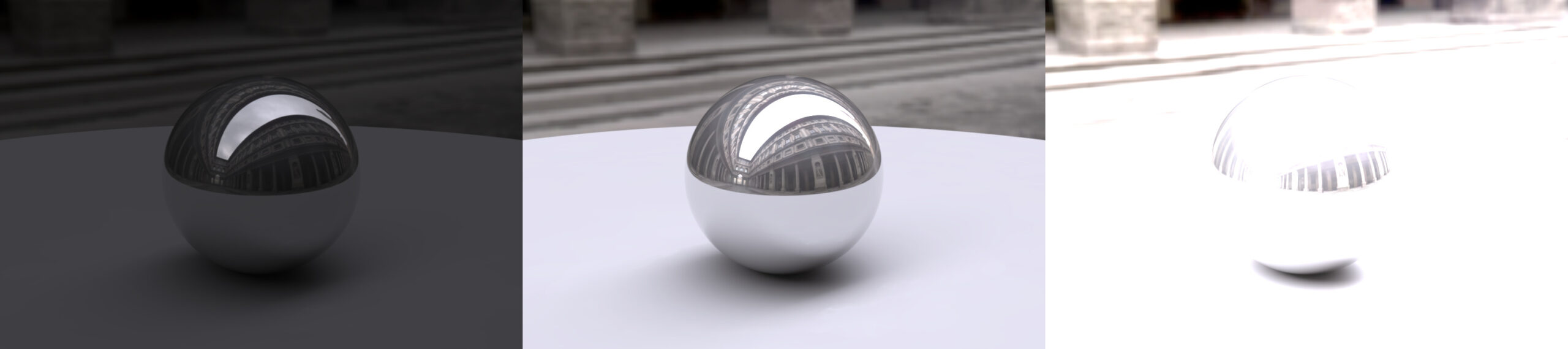
High dynamic range (HDR) refers to the ratio between the brightest and darkest parts of a scene a camera can record. Real scenes routinely span a brightness range far wider than any single sensor readout can capture in one shot. Multi-frame HDR fusion solves this by capturing several images at different exposures — typically three to five, but sometimes many more — and mathematically combining them into one image that keeps detail in both the highlights and the shadows.
It’s a three-part idea: capture a burst of bracketed exposures, align them, then merge and tone-map them into a single photo that fits on an ordinary screen or print.
Why One Exposure Falls Short
A camera sensor has a finite dynamic range — the span between the deepest shadow it can record before noise drowns it out and the brightest highlight before the pixel saturates. A modern full-frame sensor might capture roughly 12 to 14 stops of dynamic range in ideal conditions, but a high-contrast scene — a sunset, a church interior with stained glass, a backlit portrait — can easily exceed that. An 8-bit JPEG, meanwhile, can only display around 8 stops.
Exposure is a trade-off. Expose for the highlights and the shadows go black; expose for the shadows and the highlights clip to white. Bracketing sidesteps the trade-off by taking multiple shots, each optimized for a different part of the scene.
The Fusion Pipeline, Step by Step
Although implementations differ, nearly every multi-frame HDR system follows the same sequence.
1. Capture — exposure bracketing
The camera fires a rapid burst, shifting exposure between frames — a common scheme is −2 EV, 0 EV, and +2 EV. The underexposed frame protects the highlights, the overexposed frame lifts the shadows, and the middle frame anchors the midtones. Some smartphones go further, capturing a dozen or more short exposures in a fraction of a second.
2. Alignment
Even a handheld burst introduces tiny shifts between frames. The software must align them to sub-pixel accuracy, often using motion estimation (optical flow) to warp each frame onto a reference image. This is what lets modern phones shoot HDR handheld instead of only on a tripod.
3. Merging
The aligned frames are combined into a single high-bit-depth radiance map. The merge is not a plain average — each pixel is weighted by how trustworthy it is. Pixels near saturation (blown highlights) or buried in noise get less weight, so the best-exposed version of each pixel wins. Robust merging also rejects outliers, which is how it avoids letting a lens flare or a specular glint ruin a region.
4. Tone mapping
The merged result holds far more dynamic range than a display can show. Tone mapping compresses that range back into viewable values while preserving local contrast, so the image looks natural rather than flat. Well-known operators include Reinhard’s global tone mapping and the Mertens–Kautz–Van Reeth exposure-fusion method; many cameras and editors offer several operators, each with a different look.
Ghosting: The Hardest Problem
If anything moves between frames — a person, leaves in the wind, a passing car — naive merging paints a translucent “ghost.” Deghosting algorithms detect which pixels differ across frames and fall back to a single, sharp reference frame for those regions. This is the single biggest differentiator between a convincing HDR image and an obviously fake one, and it’s where most of the research effort in computational HDR is spent.
HDR on Your Phone vs. Your Camera
Phones have made multi-frame HDR the default rather than an option. Google’s HDR+, Apple’s Smart HDR, and Samsung’s equivalents all work this way: the camera is already buffering a burst of frames before you press the shutter, then aligns, merges, and tone-maps them in well under a second. Because a phone merges many short exposures, it also reaps a side benefit — averaging frames reduces noise, so handheld low-light shots come out cleaner too.
Dedicated cameras and desktop editors (Lightroom, Photoshop, Photomatix, and open-source tools such as Luminance HDR or RawTherapee) give you manual control over bracketing width, alignment, deghosting strength, and tone mapping — more work, but finer control for landscape, real-estate, and architectural photographers who shoot on tripods.
Conclusion
Multi-frame HDR fusion is one of the quiet revolutions of computational photography. By capturing several exposures and merging them intelligently — aligning frames, weighting pixels by quality, deghosting motion, and tone-mapping the result — it produces images that feel closer to what the human eye actually sees. Understanding the pipeline also makes you a better photographer: it tells you when to hold still, when to use a tripod, and why that “HDR look” can be dialed up or down. The next time your phone nails a sunset, you’ll know about the burst of frames working behind it.
FAQ
How many exposures does HDR fusion need?
Three bracketed shots (−2, 0, +2 EV) is the classic minimum for software HDR. Phones often capture far more — a burst of many short exposures — to expand dynamic range and reduce noise at the same time.
Why do my HDR photos sometimes look “fake” or oversaturated?
That’s usually an aggressive tone-mapping operator over-compressing the dynamic range and boosting local contrast and saturation. Backing off the HDR strength, or switching tone-mapping operators to a more natural curve, fixes most of it.
Can I shoot HDR handheld?
Yes. Modern alignment (optical-flow warping to sub-pixel accuracy) lets phones and cameras merge handheld bursts reliably. A tripod still helps in very dim scenes or when you want the sharpest possible architectural detail.
Related Posts

AI Scene Detection and Auto-Enhancement: How Your Phone’s Camera Sees What You See
What Is AI Scene Detection? Point your phone at a…

AI Super-Resolution Explained: How Neural Networks Rebuild Lost Detail
Zoom into an old, low-resolution photo and you hit a…
Computational Zoom: How Phones Fake Telephoto (And Why It Works)
Open your phone’s camera app and pinch up to 10x.…