Every digital camera gives you the same basic choice: shoot in RAW, shoot in JPEG, or save both at once. It looks like a small menu setting, but it has a big effect on image quality, file size, and how much editing freedom you have later. Here is a clear breakdown of what each format is, how they differ, and when you should pick one over the other.
What Is a RAW File?
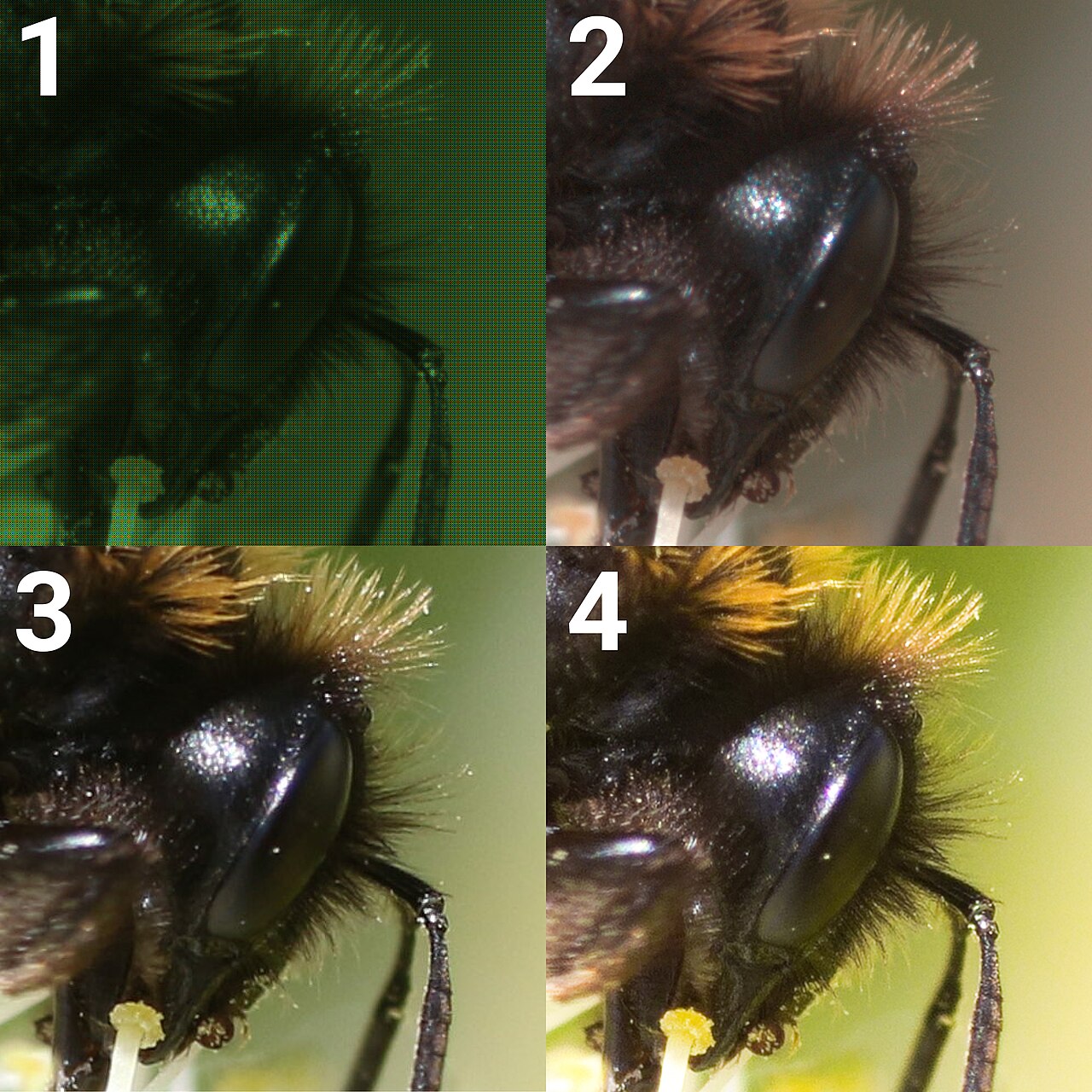
A RAW file is the unprocessed data captured directly by your camera’s sensor — a kind of digital negative. When you shoot RAW, the camera records essentially everything each photosite (pixel) saw, with little to no processing applied. That is why RAW files often look flat and slightly washed out before you edit them: none of the contrast, saturation, or sharpening has been added yet.
RAW files typically store 12-bit or 14-bit color data per channel, which is far more information than a JPEG can hold. The trade-off is that RAW files are large (often 20–100 MB or more), and you need dedicated software such as Adobe Lightroom, Capture One, or the free editor that came with your camera to view and edit them. Every brand also uses its own RAW format — Sony uses .ARW, Canon uses .CR3, and Nikon uses .NEF — which is one reason RAW is sometimes called a proprietary format.
What Is a JPEG File?
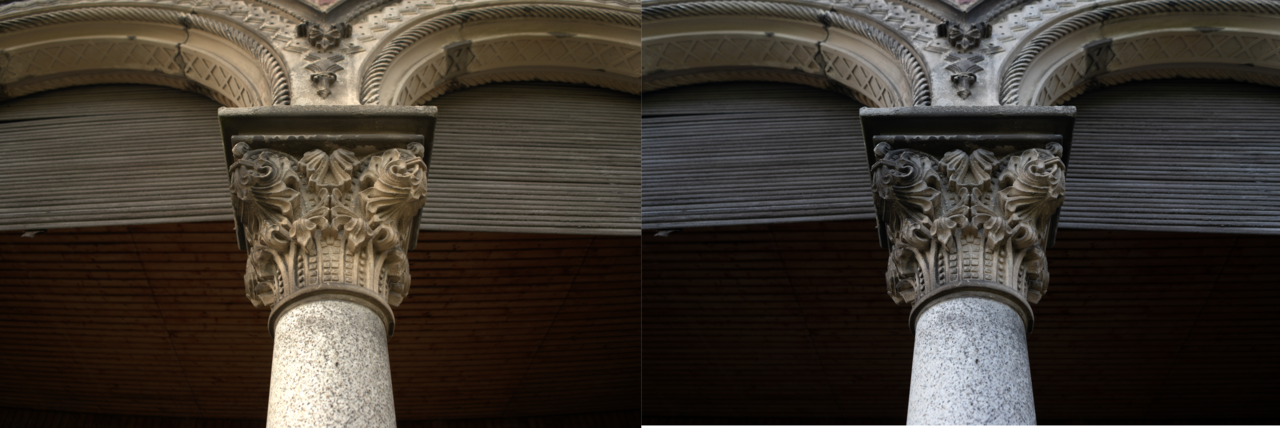
JPEG is a processed, compressed file. When you shoot JPEG, the camera acts as a miniature photo lab: it applies white balance, a tone curve, contrast, saturation, sharpening, and noise reduction, then compresses the result into an 8-bit file and throws away the data it does not need. That compression is “lossy,” meaning some detail is permanently discarded.
The result is a small, shareable image that looks finished the moment you take it — no editing required. But because the settings are baked in, you have much less room to change things later. An 8-bit JPEG stores 256 tonal values per color channel (about 16.8 million colors total), compared with thousands of levels per channel in a 12-bit or 14-bit RAW file.
RAW vs JPEG: The Key Differences
| Feature | RAW | JPEG |
|---|---|---|
| Bit depth | 12–14 bit | 8 bit |
| Colors available | ~68 billion (12-bit) | ~16.8 million |
| File size | Large (20–100+ MB) | Small (2–20 MB) |
| Processing | You edit it yourself | Camera does it |
| White balance | Fully adjustable | Baked in |
| Highlight/shadow recovery | Strong | Limited |
| Sharing | Needs export | Instant |
When to Shoot RAW
Reach for RAW when the photo matters and you want maximum flexibility later:
- High-contrast scenes — sunsets, interiors with bright windows, or backlit subjects, where you will want to recover shadows and highlights.
- Low light and high ISO — RAW gives you more control over noise reduction in post.
- Color-critical work — product, wedding, and fashion photography where accurate color matters.
- Large prints — every bit of detail counts when you are printing big.
When to Shoot JPEG
JPEG makes more sense when speed and convenience matter more than editing latitude:
- Sports and burst shooting — smaller files fill the buffer slower, so you can shoot longer bursts.
- Fast turnaround — event, press, and social-media work where images need to go out quickly.
- Casual shooting — everyday snaps and family photos that will never be heavily edited.
- Consistent look — when you like your camera’s in-camera processing and do not want to spend time editing.
RAW + JPEG: The Best of Both Worlds
Nearly every modern camera can save RAW and JPEG simultaneously. You get an instant JPEG for quick sharing and a full-data RAW file tucked away for serious editing later. The cost is extra card space and a slightly shorter burst buffer, but for many photographers it is an ideal safety net — especially while you are still deciding which workflow you prefer.
Frequently Asked Questions
Do I need special software to open RAW files?
Yes. RAW files are not universally readable, so you will need an editor that supports your camera’s format — Adobe Lightroom, Capture One, or the free software bundled with your camera all work.
Is RAW always better than JPEG?
No. RAW is better for editing flexibility and maximum quality, but JPEG is better for speed, convenience, and instant sharing. The “better” format depends on the job.
Can I convert a JPEG back into a RAW file?
No. The data JPEG compression discards is gone permanently. Once an image is saved as a JPEG, you cannot recover the extra bit depth and latitude a RAW file would have had.
Conclusion
RAW and JPEG are not rivals — they are two tools for two different jobs. If you want maximum quality and the freedom to fix mistakes later, shoot RAW. If you want small files and images ready to share the second they leave the camera, shoot JPEG. And if you cannot decide, shoot both. The best choice is the one that fits how you actually work.
Related Posts
Focus Modes Explained: AF-S, AF-C and Manual Focus
Every time you half-press the shutter button, your camera has…
Aperture and Depth of Field Explained: A Complete Beginner’s Guide
Aperture is one of the three pillars of the exposure…
The Exposure Triangle: Aperture, Shutter Speed and ISO Explained
Every photograph you take is the result of one simple…