Record a video on almost any camera and your footage is storing less color than you think. Behind the scenes, the file format quietly discards a big chunk of the color information — and in most cases you will never notice. That invisible compression step is called chroma subsampling, and it is the reason your camera’s spec sheet lists numbers like 4:2:0, 4:2:2, and 4:4:4. Understanding them takes five minutes and will save you from soft edges, muddy green screens, and banding the moment you start to grade or key your footage.
What Luma and Chroma Actually Are
Video is not stored as red, green, and blue values for every pixel. Most formats first convert the signal into a color space called YCbCr. The Y channel carries luma — brightness — while Cb and Cr carry chroma, the color-difference information. The split matters because your eye is not equally good at seeing both. Human vision is far more sensitive to differences in brightness than to differences in color, so an encoder can throw away color detail that your eye barely misses while keeping every scrap of brightness detail. That is the entire idea behind chroma subsampling: keep all the luma, and reduce the chroma.
Reading the Numbers: 4:4:4, 4:2:2, 4:2:0
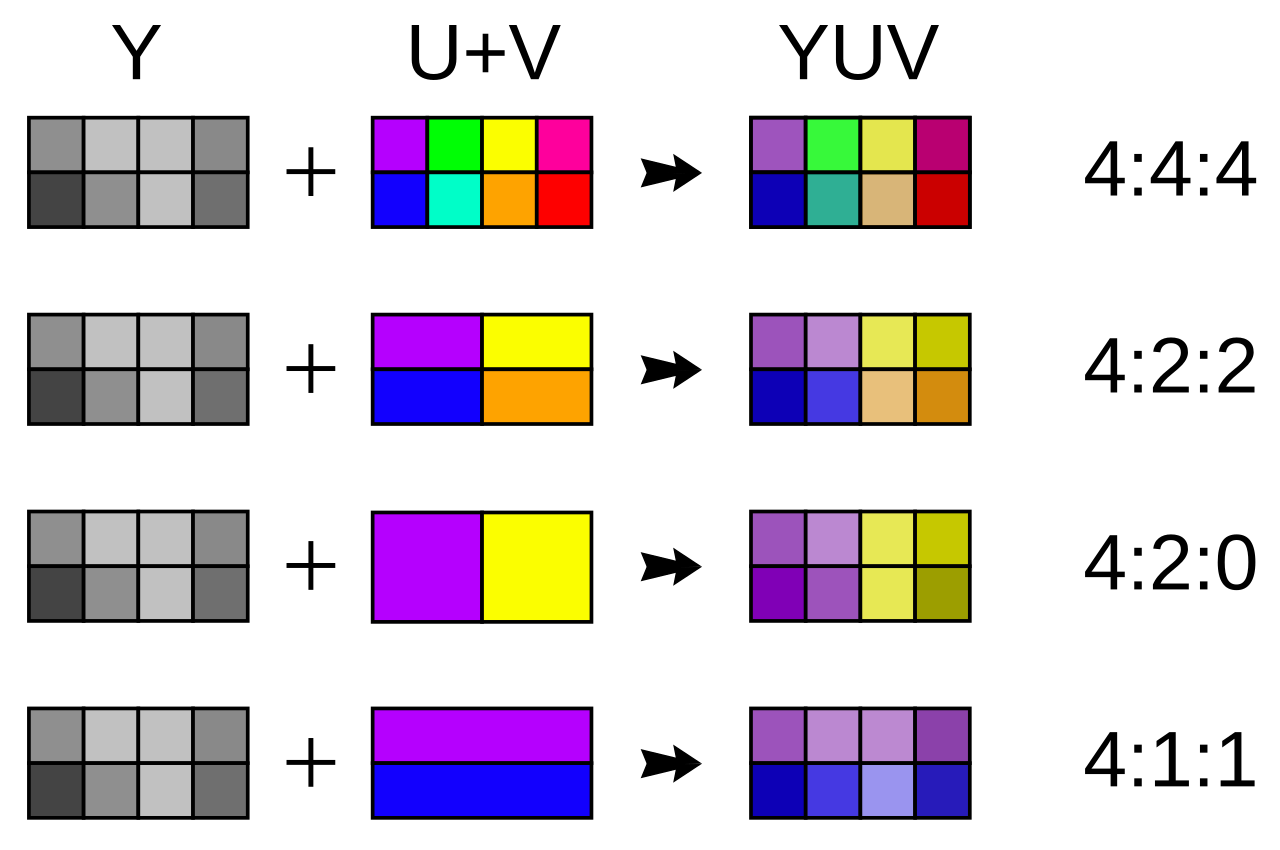
Those three-number ratios describe a block of pixels, conventionally four pixels wide. The first number is the width of the reference sampling region — always 4 in the common cases. The second and third numbers tell you how many chroma samples are kept in the first and second rows of that block.
- 4:4:4 — every pixel gets its own chroma sample. No subsampling, full color resolution, the highest quality.
- 4:2:2 — the first row keeps two chroma samples for its four pixels and the second row keeps two as well. Color detail is halved horizontally.
- 4:2:0 — the first row keeps two chroma samples, the second row keeps none (it reuses the row above). Color detail is halved both horizontally and vertically, leaving one quarter of the full color resolution.
- 4:1:1 — one chroma sample per four pixels horizontally, quartering color resolution in one direction only; used by some older DV formats.
Why 4:2:0 Is the Default Everywhere
4:2:0 is the workhorse of modern video. Relative to 4:4:4 it carries roughly half the total data while looking nearly identical in normal viewing, which is why it underpins H.264/AVC, HEVC/H.265, YouTube, streaming services, broadcast television, and Blu-ray. It is also what essentially every smartphone records by default. The savings compound: a format that can halve the bitrate for the same perceived quality means smaller files, faster uploads, and cheaper storage — wins the viewer can see and feel.
When Subsampling Actually Bites
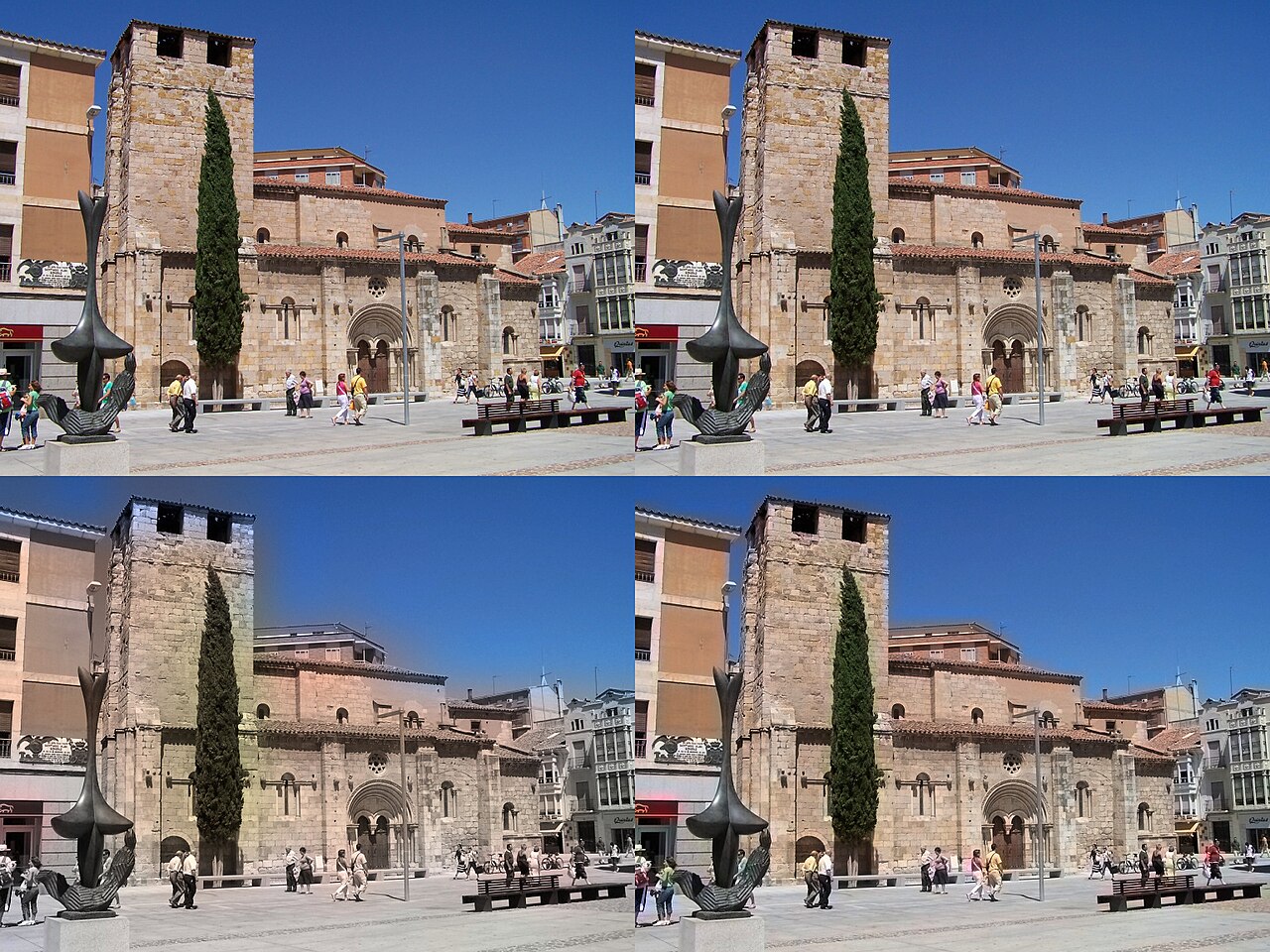
4:2:0 hides its compromises until you push the footage. The classic failure is chroma keying, where a green screen is replaced by a background: because the green channel’s fine detail is smeared, edges pick up fringes and spill that are painful to key cleanly. The same blur hurts fine colored text and graphics — UI overlays, subtitles, LED signs — which come out soft or fringed. And heavy color grading amplifies the problem: push a saturated, subsampled clip hard and you start to see blocky color artifacts and banding where smooth gradients should be.
What Your Camera Records
Most consumer and smartphone footage is 8-bit 4:2:0. That is fine for sharing and casual delivery, but thin for serious post work. Many modern mirrorless cameras step up to 10-bit 4:2:2 recorded internally — cameras such as the Sony a7 IV and the Canon EOS R6 Mark II fall into this camp — giving you both finer gradation (more bit depth) and more intact color detail, which is why they are the go-to for colorists. For the highest-end work, external recorders capture 4:4:4 or RAW, which is not chroma-subsampled at all. Note that bit depth and subsampling are separate settings that stack: 10-bit 4:2:0 and 10-bit 4:2:2 are both common, and the second is meaningfully better to grade.
Which Setting Should You Choose?
If you deliver straight to social media or a client who just needs the file, 8-bit 4:2:0 is perfectly fine and keeps files small. If you plan to color grade, key, or do any VFX, enable 10-bit 4:2:2 internally if your camera offers it. Reserve 4:4:4 and RAW for green-screen-heavy and high-end finishing work where every pixel of color counts — and budget for the storage, because those files are large.
Conclusion
Chroma subsampling is one of those quiet engineering decisions that runs the whole video world without most of us ever noticing. It explains why streaming looks so good for so little data, and why the same file can be a joy to share yet a nightmare to key. Once you know what 4:2:0, 4:2:2, and 4:4:4 mean, choosing recording settings becomes a simple matter of matching your format to the job in front of you.
FAQ
Is 4:2:0 footage noticeably worse than 4:4:4?
For normal viewing, the difference is almost invisible because human vision is weak at fine color detail. The gaps only show up when you key, grade heavily, or work with fine colored text.
Does chroma subsampling affect still photos too?
Yes — JPEG compresses color with 4:2:0 subsampling by default. RAW files, by contrast, keep full (unsubsampled) color information, which is one reason they are bigger and more flexible.
Can I convert 4:2:0 footage to 4:4:4 afterward?
No. You can transcode to a 4:4:4 codec, but the discarded color detail cannot be recovered — the file only gets bigger without regaining quality.
Related Posts
Pixel Shift Multi-Shot Explained: How Cameras Produce 400MP Photos from a 100MP Sensor
Most cameras are locked to the resolution printed on the…
Sensor Cleaning and Camera Maintenance: The Complete Guide
Every photographer eventually notices them: faint dark spots that appear…
Weather Sealing in Cameras Explained: IP Ratings, Seals & Limits
"Weather sealing" is one of the most heavily marketed —…