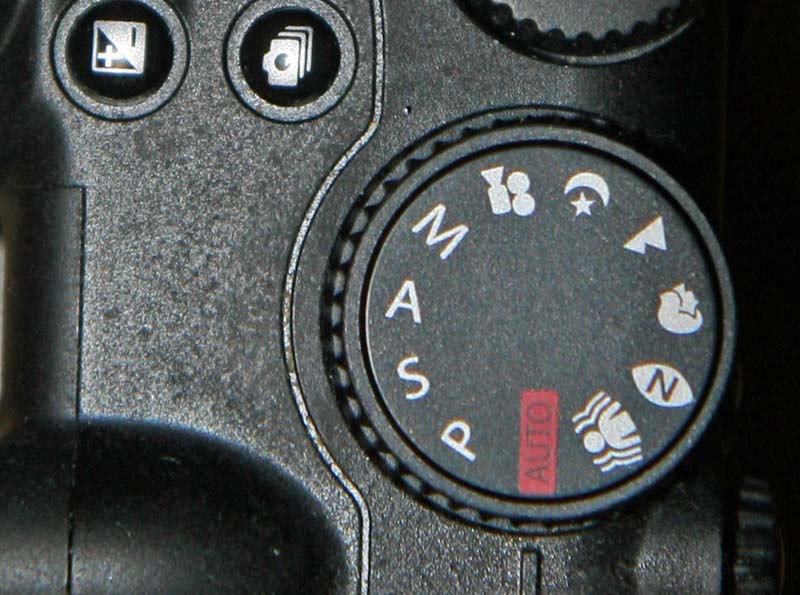
Look at the top of any modern camera and you’ll find a cluster of letters: P, A (or Av), S (or Tv), and M. They look like jargon, but they’re really just four ways of splitting one job — deciding how bright your photo will be and how much creative control you keep. Once you understand what each mode hands you, the letters stop being a mystery and become a shortcut.
The Three Knobs of Exposure
Every exposure mode is built on the same three controls:
- Aperture (the f-stop) — how wide the lens opens. It controls brightness and depth of field.
- Shutter speed — how long the sensor sees light. It controls brightness and motion blur.
- ISO — the sensor’s sensitivity. Higher means brighter but noisier.
An exposure mode is simply a rule about which of these three you set and which the camera sets for you. That’s the whole idea.
Program Mode (P)
In Program mode, the camera chooses both aperture and shutter speed to reach a correct exposure, while you stay in charge of ISO (or Auto ISO), white balance, drive mode, and other settings. Unlike full Auto, Program doesn’t lock you out of anything — you can still fine-tune. Most cameras also offer program shift: turn a dial and the camera trades shutter speed for aperture (or vice versa) while holding the same exposure. Use P when you want the camera to do the thinking but still want quick access to a faster shutter or deeper focus.
Aperture Priority (A / Av)
Aperture Priority is the workhorse for most photographers. You pick the aperture, and the camera sets the shutter speed required for a correct exposure. Because aperture controls depth of field, this is the mode to use whenever how much is in focus matters most. A wide aperture (low f-number like f/1.8) blurs the background for portraits; a narrow aperture (high f-number like f/11) keeps everything sharp for landscapes. Just keep an eye on the shutter speed the camera picks — if it drops too low to hand-hold, raise your ISO.
Shutter Priority (S / Tv)
Shutter Priority flips the roles: you lock in the shutter speed, and the camera chooses the aperture. Use it whenever motion is the point. A fast shutter (1/1000s and up) freezes action — sports, wildlife, running kids. A slow shutter (1/30s or longer) deliberately blurs motion — silky water, car light trails, intentional panning. Watch the aperture readout; if the camera warns it can’t open wide enough, you’re likely underexposing and need more light or a higher ISO.
Manual Mode (M)
In Manual, you set aperture and shutter speed yourself (and usually ISO), and the camera just shows a meter you can follow or ignore. It’s slower — so why bother? Because there are times you can’t trust the meter, or you need consistency across frames. In a studio with flash, the meter doesn’t know a burst of light is coming. Shooting a panorama or time-lapse, you want identical exposure in every frame. For long-exposure night work, the meter can’t read a dark sky. Manual is for when you want the same settings no matter what the camera thinks.
Auto ISO Changes the Game
Modern cameras let Auto ISO work inside Manual mode too, turning M into a smart hybrid: you fix aperture and shutter speed, and the camera floats ISO to hold exposure. This is hugely popular for wildlife and action, where you need a locked fast shutter and a chosen aperture but can’t predict the light. Many bodies also let you set a minimum shutter speed and an ISO ceiling, so Auto ISO stays within limits you’re comfortable with.
Why the Letters Differ (Av/Tv vs A/S)
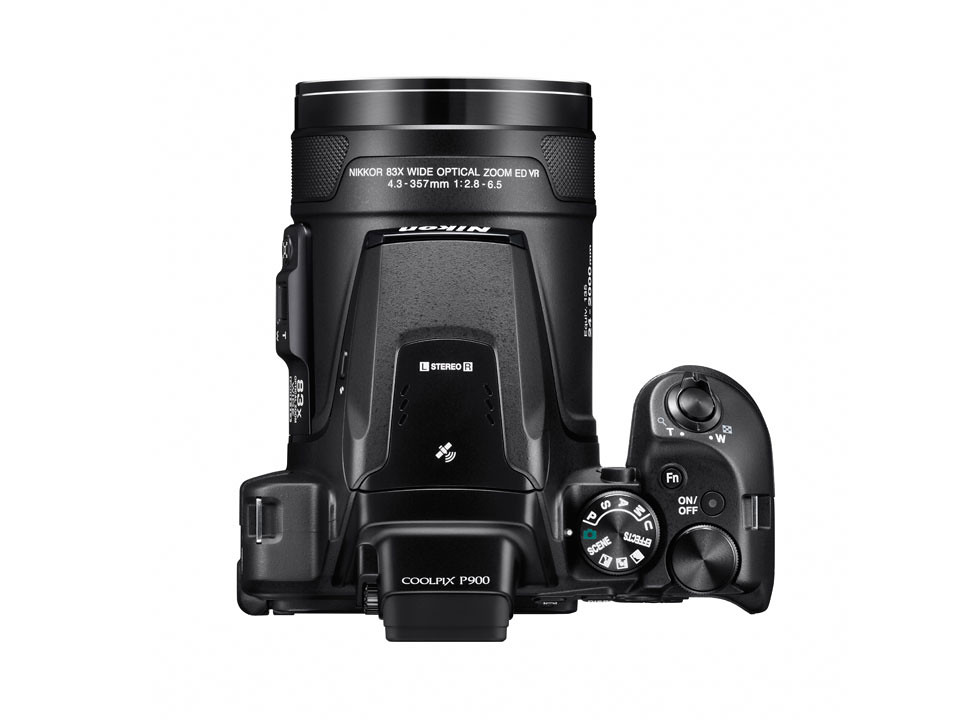
The naming is a historical quirk, not a functional difference. Canon uses Av (“Aperture Value”) and Tv (“Time Value”), terms left over from an old exposure system. Nikon, Sony, Fujifilm, Panasonic, and most others use the simpler A and S. They mean exactly the same thing — so if a tutorial tells you to “shoot in Av mode” and your dial only shows A, you’re looking at the same setting.
A Quick Decision Guide
- Blurred background or deep focus? → Aperture Priority (A / Av)
- Freezing or blurring motion? → Shutter Priority (S / Tv)
- Consistent exposure in tricky light, flash, or panoramas? → Manual (M)
- Fast, no-fuss snapshot? → Program (P)
Conclusion
You don’t need to master all four modes at once. Start in Aperture Priority — it teaches you the exposure triangle while the camera catches the shutter speed for you — then reach for Shutter Priority and Manual as specific situations demand. Once you know which knob each mode hands you, choosing a mode becomes as quick as the photo in your head.
FAQ
What’s the difference between P mode and full Auto?
Program picks aperture and shutter speed but still lets you change ISO, white balance, exposure compensation, and drive mode. Full Auto locks down almost everything, including flash and focus behavior.
Which exposure mode should a beginner use?
Aperture Priority is the most common recommendation. It gives you creative control over depth of field while the camera handles exposure — a gentle way to learn.
Can I use exposure compensation in Manual mode?
It depends. With fixed ISO in true Manual, exposure compensation has no effect because you set everything. With Auto ISO enabled in Manual, many cameras let you bias exposure using exposure compensation.
Do I need Manual mode if I already use Aperture Priority?
Not for everyday shooting. Manual earns its place for flash, panoramas, time-lapses, and very dark scenes where the meter is unreliable and you need settings that stay put.
Related Posts
HEIF vs JPEG: What’s the Difference and Should You Switch?
Tap the shutter on a modern iPhone or a recent…
Focus Modes Explained: AF-S, AF-C and Manual Focus
Every time you half-press the shutter button, your camera has…

Focus Stacking Explained: How to Get Everything Sharp from Front to Back
Try to photograph a flower, an insect, or a piece…